React Server Components on Gumroad: from 53 to 80 on mobile PageSpeed


By Justin Gordon (CEO of ShakaCode, React on Rails creator) and Ramez Weissa · October 2026
Gumroad's job is to help creators sell products. Shoppers follow links directly to product pages, where they need the details to load quickly and the "Add to cart" button to respond when they click it. Search crawlers need access to that product content too. Speed matters for the buying experience, and Google uses Core Web Vitals in its ranking systems.
Gumroad previously used my library, React on Rails, before moving to Inertia in 2026.
React on Rails Pro now supports React 19's React Server Components (RSC), which open up new ways to improve performance. LLM coding tools can also reduce the work involved in trying an RSC migration.
Since Gumroad is open source, I wanted to see how much faster RSC and React on Rails could make its product page. We could keep Inertia for areas where it works well, like creator dashboards.
So my team at ShakaCode got to work!
We migrated the profile-layout Product page in our Gumroad fork to React Server Components through React on Rails Pro, keeping Inertia elsewhere.
Compare the pages and PageSpeed reports
Our October 1, 2026 mobile PageSpeed reports scored 80 with React Server Components and 53 with Inertia. On desktop, the scores were 98 and 66. The two live deployments come from our Gumroad fork. One serves the product page through Inertia; the other enables RSC with a feature flag. Open both pages, then compare their reports:
| Comparison | Inertia | React Server Components |
|---|---|---|
| Live product page | Open Inertia page | Open RSC page |
| Mobile PageSpeed | 53 | 80 |
| Desktop PageSpeed | 66 | 98 |
| Saved reports | Mobile · Desktop | Mobile · Desktop |
Click Analyze again on either report to test that URL now. Use the same device tab for both and run each several times. We saved these reports from separate runs, not a controlled before/after test. We couldn't verify that both deployments used matching source versions at the time. The scores can vary, and the deployments may have changed since. Report details.
I also checked a product on Gumroad's live site. Its October 6 mobile report scored 56 for performance and separately showed a failed Core Web Vitals assessment from real-user data. It is a different product and layout, so it offers context rather than a third variant in our comparison.
RSC first paint: 8× faster on cold visits
We also used ShakaPerf to repeat the tests with matching throttling settings for both variants. It lets a coding agent measure each change and check for visual regressions as it iterates. In our captured cold-load screenshots, both versions looked identical. RSC showed the biggest gains on the first visit, with improvements on repeat visits too.
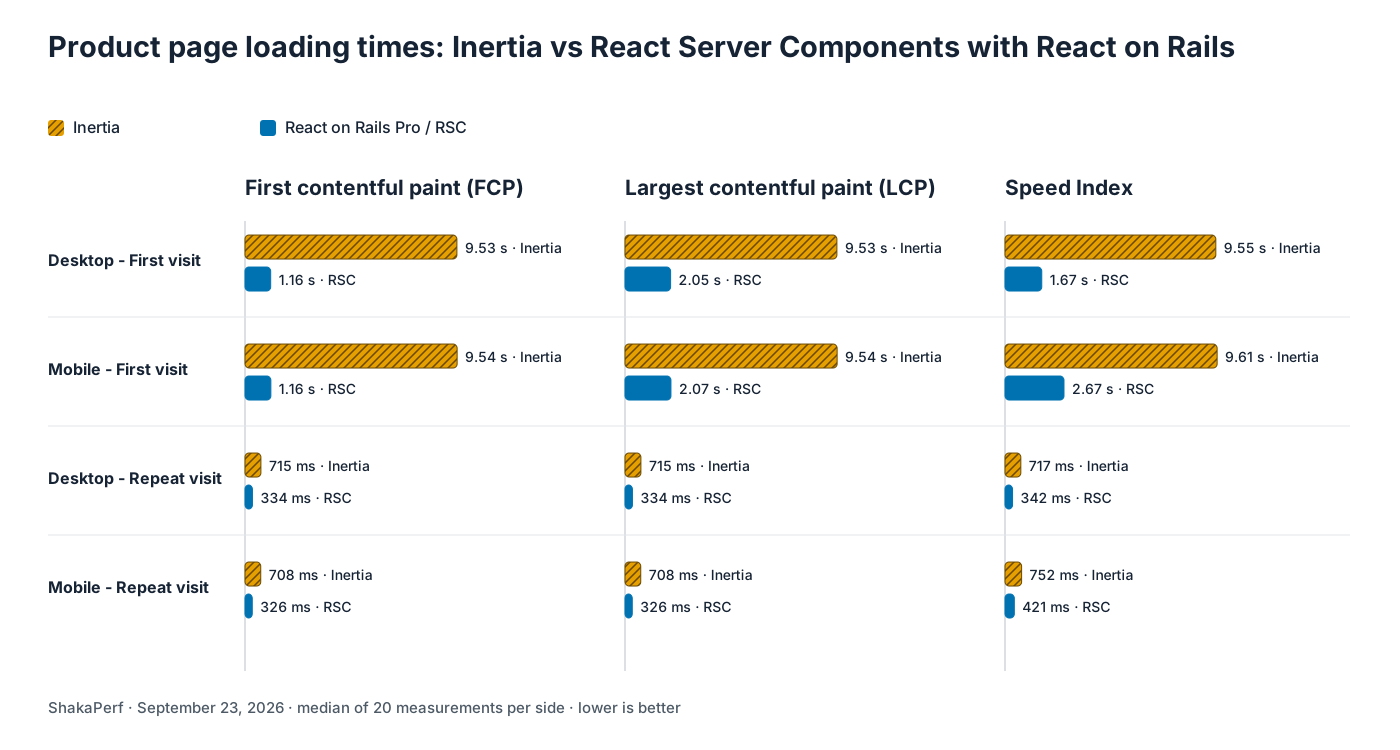
The results:
- Each case used 20 paired measurements under the same throttling settings.
- With empty caches on both mobile and desktop, median first contentful paint (FCP) fell from about 9.5 seconds to 1.16 seconds, roughly 8× faster.
- Even with cached JavaScript, the paired improvement was 52.6% on desktop and 53.7% on mobile.
Watch both versions load

What changed on the RSC Product page
| Area | What we changed |
|---|---|
| Product React tree | Refactored the existing component tree into Server Components and client components, introducing "boundaries" around interactive UI |
| Product content and layout | Moved rendering to Server Components, streamed through React on Rails Pro |
| Purchase interactions | Kept interactive purchase controls in client components |
| Business logic | Kept in Rails |
| Rollout and rollback | Added a seller-scoped feature flag for the profile-layout Product page route; disabling it restores the Inertia route |
| Scope | Product pages using the profile layout; seller profiles, checkout and other pages remain on Inertia |
The implementation is in PR #103: Optimize Product page with React Server Components.
How the two versions render
Our Inertia page uses client-side React. The browser receives the JavaScript bundles and product data, then runs that JavaScript to render the page.
The RSC version splits the page into Server Components and client components. React on Rails Pro streams HTML so product content can appear while JavaScript is still loading. Server Component code stays on the server; the browser hydrates the client components that handle interactions.
Server rendering also makes sense for product-page SEO: crawlers get the product content in the initial HTML. Google can render JavaScript, but recommends server rendering or prerendering because not all bots can. That makes server rendering useful for crawlability; we didn't measure changes in indexing or search rankings.
Purchase button interaction
We tested the purchase flow on mobile: open the product page, click the sticky Add to cart button without scrolling, then use the controls it reveals to continue to checkout.
Both versions kept checkout on Inertia.
In that recording, the test clicked Add to cart 3.5 seconds earlier with React Server Components, counting from when it opened the Product page. We recorded this interaction once, separately from the repeated page-load tests. We'd need more runs to know whether that gain is typical, and we didn't measure sales.

What you should take from this
- You can keep Inertia and use React Server Components on the pages where you need them, as we did with this product page.
- LLM coding tools can reduce the work involved in trying an RSC migration. Engineers still need to review the changes and verify the result.
- If performance matters, why not try one page? Measure how it loads and responds to clicks, then try RSC behind a feature flag. Keep it if the gains are worth the extra complexity. You can point your LLM at this example for details on how to do this.
If you'd like help integrating React Server Components with your Rails app, get in touch. We'd love to hear from you.
Supporting reference
Read the companion article for methodology, costs, SEO considerations and source evidence. RSC requires a Node renderer and increased some cold-load costs in our tests; the reference includes the measurements and trade-offs.
Closing Remark


